Govee Room Lights · Included
Let the palette leave the screen.
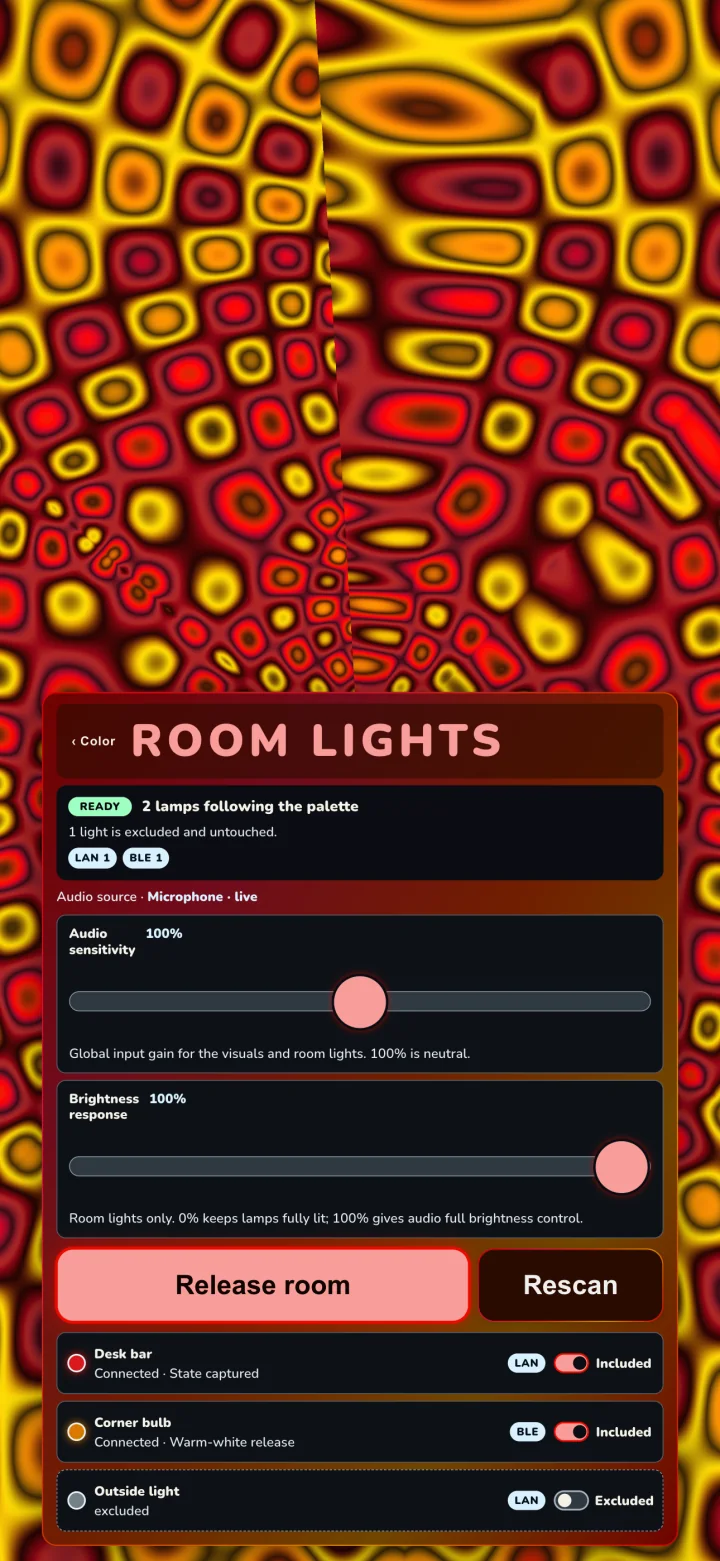
Psychodeli gives compatible Govee lights related colors from the live picture while music shapes the room’s brightness and movement. The screen and the room become one performance—not a row of bulbs repeating the same color.
- Included free
- Every supported Room Lights capability
- Local connection
- Supported Wi-Fi or Bluetooth
- No cloud login
- No Govee or Psychodeli account required
One score, several light voices
Govee makes capable light instruments. Psychodeli directs the performance.
The app does not run a separate light show beside the visual. It projects the visual’s current palette, musical energy, and structural movement into the room, so color changes on the screen and in the lamps belong to the same moment.
- Color comes from the picture
- Each controlled whole lamp receives a related color that is visibly present in the current frame.
- Brightness comes from the music
- Energy and musical movement shape the room without disconnecting the lamps from the visual palette.
- Multi-point fixtures can carry moving color
- Psychodeli tries moving color automatically on a wide range of Wi-Fi strings, bars, and lamps. For an untested model, it asks once whether the whole light came alive and returns that light to one color if the answer is No.
- Seasonal sets can direct the room
- Choose a seasonal collection in Color and the room follows those palettes. With Psychodeli Touch, Freeze set keeps color rotation moving inside that collection.
Free capability, optional authorship
The whole room performs free.
Psychodeli Touch does not unlock extra Govee hardware capability. It gives you direct control over how the room uses what it already supports.
Included
A complete automatic performance
- Free compatibility scan that changes no lamp
- Related whole-lamp palette voices
- Music-shaped brightness and autonomous groove
- Moving color, travel, shade, and pulse when the fixture confirms it works
- Browse and choose recurring seasonal palette collections
Psychodeli Touch
Take the room’s controls
- Choose the room’s groove and hold it
- Set how bright the room runs
- Keep brightness separate from musical movement
- Freeze automatic color rotation inside one seasonal set
Set up in five moves
Start with one lamp. Build the room after it answers.
- Prepare each Wi-Fi lampIn Govee Home, open every compatible Wi-Fi lamp you want to use and enable LAN Control separately. Keep the lamps and your iPhone, iPad, or computer on the same local network.
- Open Room LightsIn Psychodeli App, tap the center and choose Color → Lights. Allow Local Network access when the app asks.
- Scan before changing anythingChoose Find compatible lights. Discovery is free and read-only: it does not capture, connect to, or change a lamp.
- Include, start, confirmInclude only the lamps you want, choose Start room, and look at any untested light Psychodeli asks about. Choose Yes, keep it or No, use one colour.
- Give lights backChoose Give lights back when you finish so lamps return to their captured or documented release state.
Compatibility without guesswork
The free scan is the authority for your room.
Govee model families, firmware, and local-control surfaces vary. A lamp working in Govee Home through the cloud does not prove that it exposes a supported local path.
- Whole-lamp Room Lights
- Compatible Wi-Fi lamps with local LAN Control, plus tested Bluetooth models in the native app.
- Spatial and per-LED Room Lights
- Wi-Fi only. Psychodeli uses measured mappings where it has them and harvested model data as a starting point for many more fixtures. An untested model is tried once and asks for your verdict; No switches only that fixture to whole-lamp color. The H608B string uses 15 measured points. H6047 bars use a 20-point community mapping without a claim about their internal hardware zone count.
- Where Room Lights runs
- The current iPhone, iPad, macOS, Windows, and supported Android builds provide native local-light transport. Ordinary web browsers do not drive lamps.
- What does not qualify
- Cloud-only control, a model with no supported local interface, or a lamp isolated on a guest network will not become compatible merely because Govee Home can reach it.
Troubleshooting
If the room does not answer
Start with the connection label and the exact lamp model. “Works in Govee Home” is not enough to identify the local path.
No compatible lights found
Confirm the lamp is powered. For Wi-Fi, enable LAN Control on that individual lamp, keep the lamp and device on the same local network, avoid guest or client-isolated networks, and scan again. Some models expose no supported local control.
Local Network permission is off
Open system Settings, find Psychodeli, enable Local Network access, return to Color → Lights, and scan again.
One lamp disappears or falls behind
Keep it powered and nearby, then choose Rescan. Bluetooth lamps can lose a weak connection; Wi-Fi lamps can be isolated or delayed by router settings.
My light went dark when the room started
Open Color → Lights and find that lamp’s question. Choose No, use one colour. Psychodeli releases the untested moving-color channel immediately and keeps that lamp in whole-lamp color on future sessions. To test it again later, use Try moving colour again on the lamp row.
The lamps barely move with the music
Confirm Psychodeli has a live audio source. A free room chooses its own groove as the music changes. With Psychodeli Touch, raise or select the room groove and adjust brightness independently.
Can the room stay inside one seasonal color set?
Yes. Open Color, scroll to Seasonal, and choose a collection. Anyone can select its palettes. With Psychodeli Touch, choose Freeze set to keep automatic palette rotation moving inside that collection until you tap Frozen to release it.
Will Give lights back restore everything?
LAN lamps return to their captured state. Bluetooth models that cannot report their prior state use the release behavior named in the lamp row. Excluded lamps are never captured or changed.
Ready to try your room?
Scan first. Decide with evidence.
Install Psychodeli App, open Color → Lights, and run the free compatibility scan before building the whole room around an assumption.